
Slideout

Stack Info
- Slideout offers you a new way to display your content by creating a hidden container that slides out from the side of the page on the users command.
- Current Version: 1.1.0
- Release Date: 9th December 2013
- Last Update: 18th December 2013
- Responsive: Yes
- Requires: Rapidweaver 5+ and Stacks 2+
- Browser Compatibility: IE8+, Safari, Chrome, Firefox
User Guide
Check Back Soon!
Slideout is a Stack that is very easy to set up.
First off drag the Slideout stack anywhere on your page, and fill the empty stack container with the content you would like to display.
You can alter the colors of the Slideout stack in the HUD along with the dimensions and speed.
You are good to go :)
First off drag the Slideout stack anywhere on your page, and fill the empty stack container with the content you would like to display.
You can alter the colors of the Slideout stack in the HUD along with the dimensions and speed.
You are good to go :)
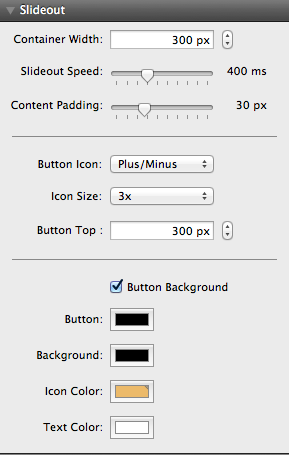
Container Width
This is the width of the container after it has been unhidden.
Slideout speed
The speed at which the container slides out onto the screen. The lower the number the faster the slide.
Content Padding
The amount of padding inside of the container, this will allow you to alter the space between the content and edge of the webpage
Button Icon
Select what Icons you would like to display to represent the open and close actions for the container
Icon Size
Select the size of the icon
Button Top
This is how far down the page you would like to display the button
Button Background
Select this box to have a background on the button which can be selected below. When this is disabled there will be no background
Background
Select the background color you would like to use for the container
Icon Color
Select the color of the icon used to enable and disable the container
Text Color
Select the color of the text inside the container, this does not override the theme or internal stacks colors.
How do I update Slideout?
Slideout uses the auto updater that is built into the stacks plug in, it will alert you when an update is available. Please follow the instructions on the updater to guide you through the process. If you are having problems you can re download and re install Weather using your original download link
How do I find my lost download link?
Please visit this link and enter your details to be resent your invoice which includes your download link.
Where do I send feature requests?
I am always looking for ways to update and improve my themes and stacks so I would love to hear your thoughts. Please send them in using the contact form on the contact page here
Can I have more than one container on the page?
At this time no but it is something that will possibly made available in future versions.