
Text Drop

Stack Info
- The Text Drop stack is perfect for displaying lots of content in a small neat fashion. With lots of icon options it is easy to display informaton to your users and using the latest jQuery animation giving the dropdown a smooth feel. This stack is great for displaying anything from FAQ's to Instructions.
- Current Version: 2.2.0
- Release Date: 13th December 2012
- Last Update: 9th August 2013
- Responsive: Yes
- Requires: Rapidweaver 5+ and Stacks 2
- Browser Compatibility: IE8+, Safari, Chrome, Firefox
User Guide
COMING SOON
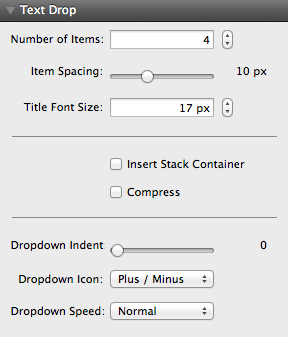
1- Select the umber of drop downs you would like to display
2- Enable the "Insert Stack Container Box"
3- Select the drop down icon and speed
4- Insert your content into the drop downs and titles
5- Go to preview mode and tweak
Text Drop uses the auto updater that is built into the stacks plug in, it will alert you when an update is available. Please follow the instructions on the updater to guide you through the process. If you are having problems you can re download and re install Text Drop using your original download link
Please visit this link and enter your details to be resent your invoice which includes your download link.
I am always looking for ways to update and improve my themes and stacks so I would love to hear your thoughts. Please send them in using the contact form on the contact page here
Unfortunately at this time that has not built in due to the complication of adding it and how the stack is built. In a future version and re-write this is possible.
Demo
Text Drop has a title area and a drop down area for you to insert your content in, when the title is clicked the content will drop down in a smooth animation. The content below can be a text container or empty stack container.