
Vimeo Embed
Stack Info
- The Vimeo Embed stack allows you to put responsive Vimeo videos on your web page with ease. The options offered in this stack allow you to have full control over the video such as colors and what information is displayed to your visitors.
- Current Version: 1.0.0
- Release Date: 30th July 2013
- Last Update: N/A
- Responsive: Yes
- Requires: Rapidweaver 5+ and Stacks 2+
- Browser Compatibility: IE7+, Safari, Chrome, Firefox
User Guide
COMING SOON
The Vimeo embed stack was designed to be deployed as quick and as easy as possible, if you are looking for a bit of guidance about where to start follow the steps below to get your feet off the ground.
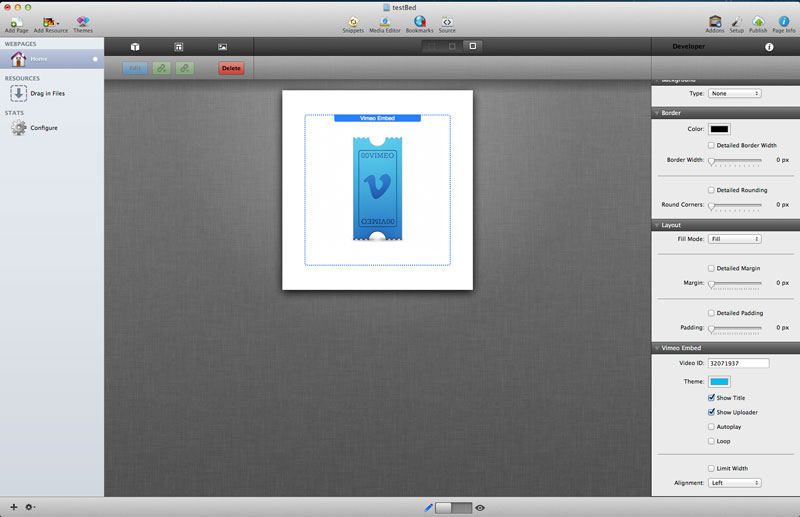
Click to enlarge
1- When you drag your Vimeo Embed stack out you will see the screen pictured above
2- To get your video displaying you will need to enter the Video ID in the stacks option pane, if you are having trouble finding the Video ID please refer to the section below
3- Change the settings below the video ID to change how you would to display the video such as enabling Auto play and Hiding Information
4- The video is set so it expands to the pages max size, if you would like to limit the max size of the responsive video you can by checking the "Limit Width" box and entering the dimensions you would like to display. For more information on limiting the width of the player please the section below.
2- To get your video displaying you will need to enter the Video ID in the stacks option pane, if you are having trouble finding the Video ID please refer to the section below
3- Change the settings below the video ID to change how you would to display the video such as enabling Auto play and Hiding Information
4- The video is set so it expands to the pages max size, if you would like to limit the max size of the responsive video you can by checking the "Limit Width" box and entering the dimensions you would like to display. For more information on limiting the width of the player please the section below.
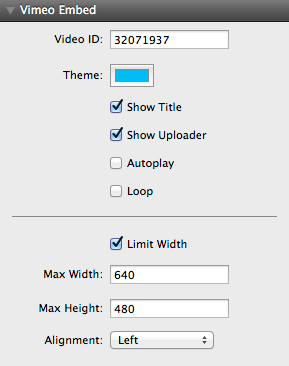
Click on the options below to expand more information
Video ID
Insert the video ID of the video you would like to display. For more information on what a Video ID is and where to find it please refer to the section below
Theme
Select the color of the theme you would like to display in the video, the theme color effects the color scheme of different elements in the video container such as play button and uploader
Show Title
Enable this to display the title of the video before the video is played
Show Uploader
Enable this box to display the uploader of the video before the video is played
Autoplay
Enable this box to play the video automatically when the page has loaded
Loop
When this box is enabled it loops the video, so when the video is over it will automatically replay and so fourth
Limit Width
The Vimeo Embed stack automatically fills out to the maximum possible container, to limit the maximum dimensions of this stack check this box. When enabled two new input boxes are displayed below
Max Width
Input the maximum width you would like the container to display. WARNING- Please use dimensions recommended in the limit dimensions section below for best results.
Max Height
Input the maximum height you would like the container to display. WARNING- Please use dimensions recommended in the limit dimensions section below for best results.
Alignment
Select the alignment you would like to display on the video. This only aligns the video when the dimensions are limited as the video automatically fills out the space it is in.
For the stack to find the video you would like to display a Video ID is required, the video ID can be found very easily following the instructions below
Go to the web page of the video you would like to use to display on your site, look at the web address in the URL bar and your Vimeo Video ID is the 8 digit number following the backslash. Just highlight the number (as shown below) and copy it into the stack options.

The Vimeo Embed stack is responsive and because of this the video player is designed to be a 100% width and height which means it will expand to the max space of the container it is in. In the stack there is an option to limit the max width and height, the container will still be responsive but it's starting size will be the values you set.
This feature can be used with any input and the videos will re-size to those dimensions but for best results it is recommended that you use the dimensions below for the best results.
Recommended Dimensions
560x315
640x360
853x480
1280x720
Custom Dimensions
To configure the best dimensions for your max video size please use this online aspect ratio calculator
http://size43.com/jqueryVideoTool.html
This feature can be used with any input and the videos will re-size to those dimensions but for best results it is recommended that you use the dimensions below for the best results.
Recommended Dimensions
560x315
640x360
853x480
1280x720
Custom Dimensions
To configure the best dimensions for your max video size please use this online aspect ratio calculator
http://size43.com/jqueryVideoTool.html
The video player is being cut off at the bottom
Due to the way some themes are built some cropping of the bottom section of the video may occur. This is easily fixed by adding bottom padding to the stack.
I have disabled showing the uploader but it is still showing up
Vimeo has a paid membership called "Plus Membership"; if the video you are trying to display is from a plus member then they have ultimate control on weather their name is shown on the video in embeds. So please be aware that it is out of the stacks control when you are using a plus members video.
How do I know if there is an update
Vimeo Embed uses the auto updater that is built into the stacks plug in, it will alert you when an update is available. Please follow the instructions on the updater to guide you through the process. If you are having problems you can re download and re install Vimeo Embed using your original download link
How can I re download Vimeo Embed?
Please visit this link and enter your details to be resent your invoice which includes your download link.
https://pressuredesigns.cartloom.com/lookup
https://pressuredesigns.cartloom.com/lookup
Limiting the width is giving a lot of black space
When Limiting the width you need to be respectful of the aspect ratio of 16:9 which Vimeo uses. To calculate the best dimensions use this calculator below
http://size43.com/jqueryVideoTool.html
http://size43.com/jqueryVideoTool.html