
Weather

Stack Info
- The Weather Stack enables you to display real time weather for any location of your choosing, this can be a great resource for your business to show the current weather and a link to the future forecast for your customers to check.
- Current Version: 2.0.0
- Release Date: 16th May 2013
- Last Update: 19th May 2014
- Responsive: Yes
- Requires: Rapidweaver 5+ and Stacks 2+
- Browser Compatibility: IE7+, Safari, Chrome, Firefox
User Guide
If you have the name of the location you would like to display then set up is as easy as dragging the stack onto your page then entering the location you want to display. Follow the steps below as a good place to get started.
1- Put the Stack on your page and enter the location you would like to display the current weather for. The recommended method to input your location is woeid, to find your woeid please visit this site.
2- Select what Unit you would like to use to display the current temperature in
3- In the layout Section select what you would like to display and un check the boxes of what you would like to hide such as title, location, Forecast link etc
4- You can override the current theme colors using the color override box, this allows you to set the colors for all of the Stacks elements.
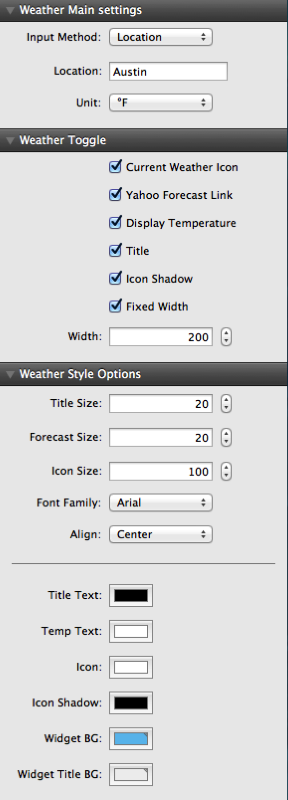
Main Settings
Location is simply the name of the location you would like to display, woeid is a locater that yahoo weather users incase your location is not being found.
Weather loads real time weather info from Yahoo Weather, if your location is listed on Yahoo Weather then this Stack will display it.
It is recommended you enter the woeid for the location, for more information on how to find the woeid please see the FAQ's.
Toggle
If this is disabled then an option to add your own link to the stack will display. If this is left blank then there will be no link on the stack.
Style Options
The weather stack uses the location you entered to search Yahoo Weather's database full of locations, if your location is not listed under Yahoos services then unfortunately the weather stack will not display the current weather for that location. Yahoo has a huge database full of locations so please try another location close to you. The recommended way to find your location in the stack is the woeid, this is a locator used by Yahoo to find locations in the world, the woeid for a location can be found on this website
A woeid is a locator used by Yahoo! to find specific locations in the world, it is incredibly accurate and the best way to find your location in the Weather Stack.
To find your woeid please visit one of the sites below and enter your location. Copy and paste that location into the Stack.
http://sigizmund.info/woeidinfo/ OR http://woeid.rosselliot.co.nz
Weather uses the auto updater that is built into the stacks plug in, it will alert you when an update is available. Please follow the instructions on the updater to guide you through the process. If you are having problems you can re download and re install Weather using your original download link
Please visit this link and enter your details to be resent your invoice which includes your download link.
I am always looking for ways to update and improve my themes and stacks so I would love to hear your thoughts. Please send them in using the contact form on the contact page here
The weather stack uses the location you entered to search Yahoo Weather's database full of locations, if your location is not listed under Yahoos services then unfortunately the weather stack will not display the current weather for that location. Yahoo has a huge database full of locations so please try another location close to you. The recommended way to find your location in the stack is the woeid, this is a locator used by Yahoo to find locations in the world, the woeid for a location can be found on this website
A woeid is a locator used by Yahoo! to find specific locations in the world, it is incredibly accurate and the best way to find your location in the Weather Stack.
To find your woeid please visit one of the sites below and enter your location. Copy and paste that location into the Stack.
http://sigizmund.info/woeidinfo/ OR http://woeid.rosselliot.co.nz