Empyrean
Theme Info
User Guide
-Empyrean is a fixed width theme as well as a responsive theme so select in the width options what you would like to use, also select a responsive or fixed option in the header section to match your choice
-Use one of the many built in theme styles in the theme to style your site
-Select your font choices, text size and decide weather you would like a sidebar
You are good to go!
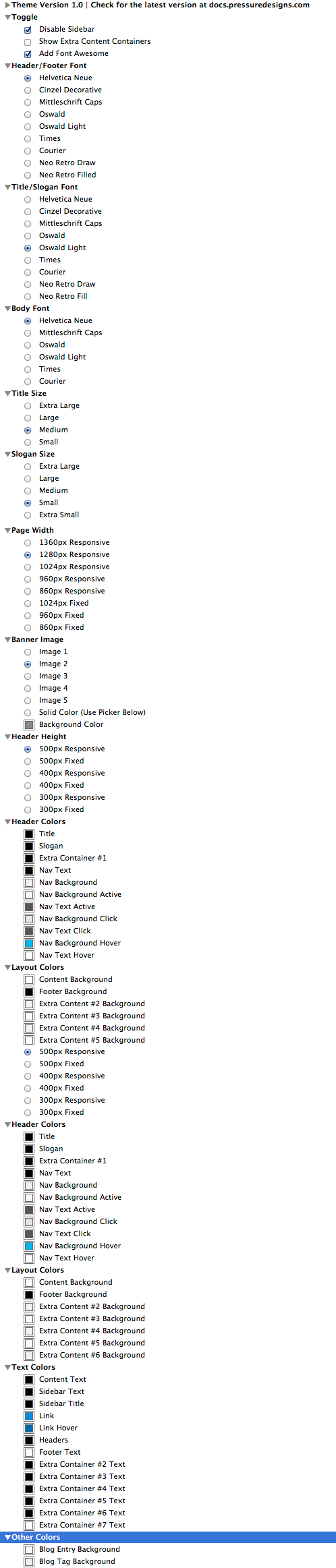
First you need to find out what version you currently have, to check your version please visit Page Info > Styles which can be displayed below. 
If your version is less than the current version which is 1.0.0 then please re download and re install Empryean using your download link in your email upon purchase.
I also send out emails to all customers who purchased Empyrean alerting them that there is an update available as well as all the information on how to download and install the update.
Please visit this
link and enter your details to be resent your invoice which includes your download link.Modifying your theme requires knowledge of HTML and CSS, if you need help changing anything within your theme please get in touch
here and I would love to help you with basic mods.I am always looking for ways to update and improve my themes so I would love to hear your thoughts. Please send them in using the contact form on the contact page
here<div class="embed-contain"> </div>
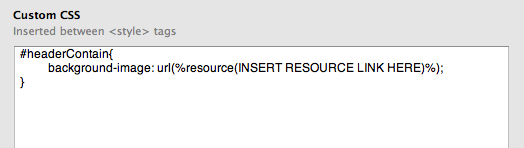
The best way to change the banner image within RapidWeaver is to add your banner image to the resources in RapidWeaver. Then copy and past the code below into Page Info -> Header -> Custom CSS replacing the INSERT RESOURCE LINK with your resource. Job Done!
You can also manipulate the icons as they are font such as color and text size using css, just add "style="color:red;"" into the opening tags along with your other style options.
<i class="XXX"></i>
Inserting it into Empyrean is incredibly easy, just drop the HTML code into your page and UI Kit does all the work, you have all these amazing features at your fingertips.
If the code is not displaying make sure you highlight the text go to format -> Ignore Formatting.
There is two ways you can fix this, you can increase the width of the page, or lower the size of the slogan or icon. The really depends on a case by case basis on which works best for you. If you need more help with this send me over a link to your site and I will take a look!